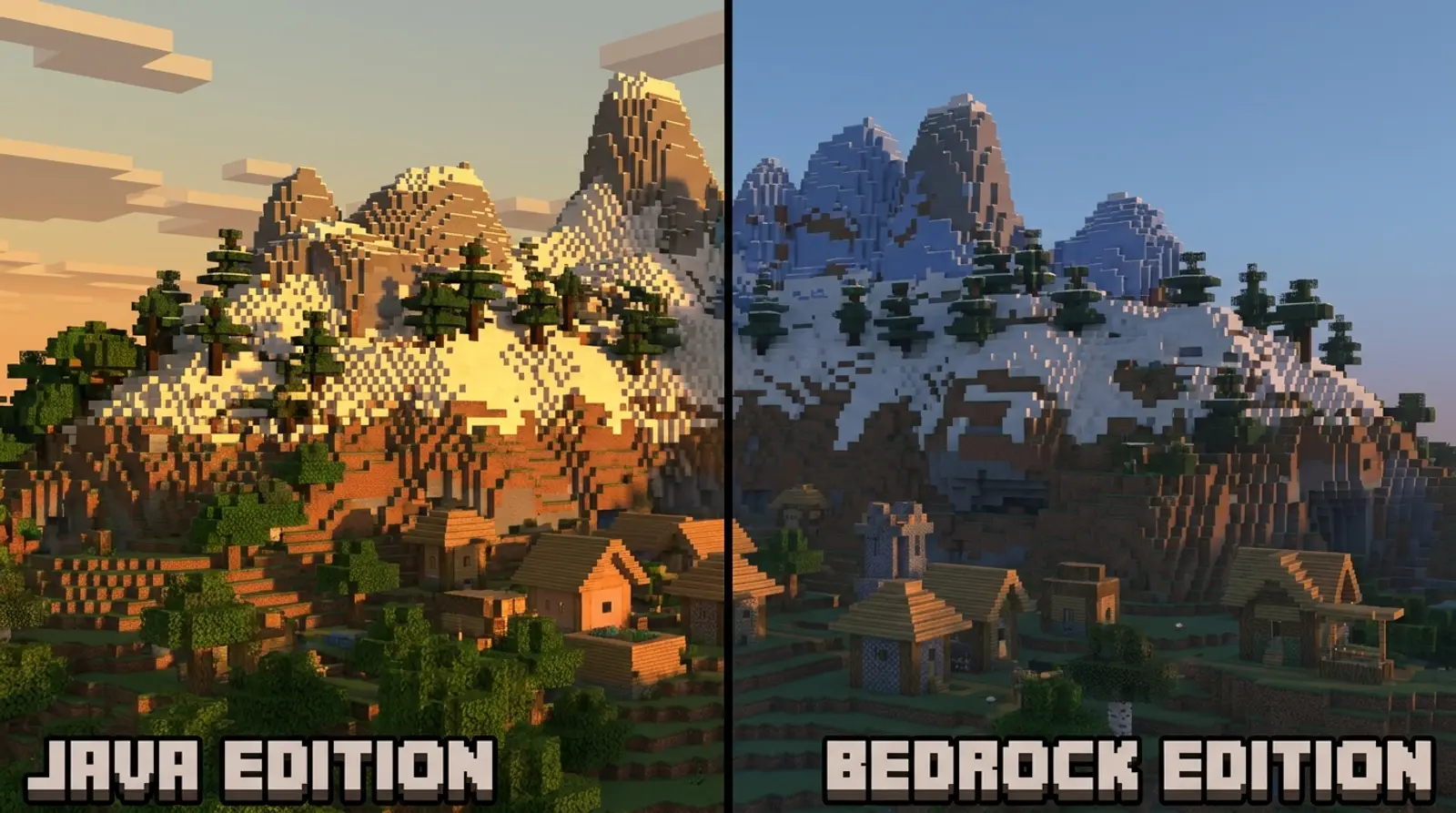
Minecraft Java vs Bedrock: Which Version Should You Run a Server On?
Minecraft Java vs Bedrock is one of the first questions everyone faces before running a server, because Minecraft isn't just one version — it splits into two main editions built on different systems. Choose the wrong one and friends may not be able to join, or you may not be able to install the mods you want.
This article explains it all: what Minecraft Java is, what Bedrock is, where the two differ, with a big comparison table covering every angle — the platforms you can play on, mod/add-on systems, cross-device play (crossplay), performance, and player base — plus how running each type of server differs and which version to choose based on your friend group.
What Is Minecraft Java?
Minecraft Java Edition is the original version of the game, built in Java and played on computers (PC) — Windows, macOS, and Linux. It's the version most beloved by the creative and modding communities because it's so open to deep customization.
Java's biggest strength is its massive selection of mods and plugins — from mods that add items and monsters to complex server systems — along with custom server software like Spigot, Paper, and Forge/Fabric. This makes Java the most flexible edition for running a heavily customized server.
What Is Minecraft Bedrock?
Minecraft Bedrock Edition is the version built in C++ to play across a wide range of devices — mobile (iOS/Android), consoles (Xbox, PlayStation, Nintendo Switch), and Windows. Its main selling point is the ability to play together across platforms (crossplay).
Bedrock is designed to perform well on lower-spec devices and run smoothly on mobile. While its customization isn't as deep as Java's, it has an Add-on system and a Marketplace for downloading skins, maps, and extra content — ideal for friend groups on a variety of devices who want to play together easily without a PC.
Minecraft Java vs Bedrock Comparison Table (Every Angle)
The difference between Java and Bedrock isn't just the name — they're different engines built for different goals. See the table below for a clear picture of every angle players should know before running a server.
| Topic | Java Edition | Bedrock Edition |
|---|---|---|
| Playable platforms | PC (Windows/macOS/Linux) | Mobile, console, Windows |
| Built in | Java | C++ |
| Cross-device play (crossplay) | No (PC with PC only) | Yes, across mobile/console/Windows |
| Customization system | Mods/plugins (Forge, Fabric, Spigot, Paper) | Add-on / Marketplace |
| Mod variety | The most, deeply customizable | Has Add-ons but less customizable |
| Performance on low-spec machines | Uses more resources | Lighter, smooth on mobile |
| Player base | PC/creative/modding crowd | Mobile/console/casual play with friends |
| Running a private server | Highly flexible, lots of customization | Easy to set up, focused on cross-device play |
Mods (Java) vs Add-ons (Bedrock): What's the Difference?
A point of confusion for many is game customization. Both versions have their own extension systems, but they work differently. Understanding this helps you decide, especially if you plan on customized play.
Java uses "mods" and "plugins" developed freely by the community, giving huge variety and very deep customization — from changing game mechanics to building entirely new server systems. Bedrock uses "Add-ons," which customize within a more limited scope but install easily and have an official Marketplace to choose from.
- Want heavy mods that deeply change game mechanics → Java is the far better fit
- Want light touches — skins/maps/simple features → Bedrock Add-ons are enough
- Java mods and Bedrock Add-ons can't be used together — match them to your server version
How Running a Java Server Differs from a Bedrock Server
When it comes to running a server, both versions have differences worth knowing. Java servers commonly use software like Paper or Spigot that support many plugins, ideal for servers wanting complex systems. Bedrock servers focus on letting cross-device players join and play together easily.
The key point is that players must use the same version as the server: a Java server only accepts Java players, and a Bedrock server only accepts Bedrock players (unless you use special bridging software, which is more complex). So before running a server, check which version most of your friend group plays and run one that matches.
Which Version to Choose Based on Your Friend Group
No version is definitively "better," because it depends on what devices your friends use and how you want to play. Look at the guidelines below to decide what fits your group best.
- Friends mainly on PC + want lots of mods/customization → choose Java
- Friends mixing mobile, console, and Windows → choose Bedrock for crossplay
- Want good performance on low-spec machines, smooth on mobile → Bedrock
- Want a deeply customized server with plugins and complex systems → Java
- Not sure yet → choose a provider that supports both versions, so you can change your mind later
Run Both Java and Bedrock with Plusweb Minecraft Hosting
The good news is you don't have to pick a provider that supports only one version. Plusweb Minecraft Hosting supports both Java and Bedrock, so you can immediately run a server matching your friend group — whether they play PC or mobile/console.
Beyond supporting both versions, it also allows mods/modpacks (for Java), includes auto-update, activates instantly, lets you choose the number of player slots, and its data center is in Thailand for low ping for Thai and ASEAN players. Starting at just ฿150/month.
- Supports both Java and Bedrock, choose by your friend group
- Install mods/modpacks (Java) with auto-update
- Instant activation, choose the number of player slots
- Data center in Thailand, low ping, 99.9% uptime
- From ฿150/month
Run a Minecraft server on both Java and Bedrock with Plusweb
Supports both versions · install mods/modpacks · instant activation · choose player slots · data center in Thailand, low ping · from ฿150/month
Frequently Asked Questions
What is the biggest difference between Minecraft Java and Bedrock?
They differ in platforms and customization systems. Java plays on PC and uses mods/plugins with the deepest, most varied customization. Bedrock plays across devices (mobile/console/Windows), supports crossplay, and uses Add-ons that customize less but install easily — and the two versions' mods can't be used together.
Should I run a Java or Bedrock server?
Choose based on your friend group. If friends mainly play PC and want lots of mods, choose Java. If friends mix mobile, console, and Windows, choose Bedrock for cross-device play. If you're not sure, choose a provider that supports both versions like Plusweb for more flexibility.
Can Java and Bedrock players play on the same server?
Generally no, because they're different engines. A Java server only accepts Java players and a Bedrock server only accepts Bedrock players (there is special bridging software, but it's more complex to set up). So check which version your friend group plays and run a matching server.
Can a Bedrock server install mods?
Bedrock uses an Add-on system instead of Java-style mods, which customizes within a more limited scope but installs easily and has a Marketplace. If you plan on heavy mods that deeply change game mechanics, the Java version is the better fit, since its mod/plugin system is the largest and most flexible.
Can one rented server run both Java and Bedrock?
Yes, if you choose a provider that supports both versions. Plusweb Minecraft Hosting supports both Java and Bedrock, so you can immediately run a server matching your friend group, install mods/modpacks, activate instantly, and get low ping from a data center in Thailand. From ฿150/month.
GUIDES
Related articles
Keep reading on similar topics
How to Make a Minecraft Server to Play with Friends (Full Guide)
Want to run a Minecraft server with friends but don't know where to start? This article covers 2 options — self-hosting on your PC vs. renting a server — with pros and cons, step-by-step setup, a RAM-by-player-count table, and how to install mods.
Read more
Best Minecraft Server Hosting: The Complete Selection Guide
Want to rent a Minecraft server but don't know which to choose? This article covers the key criteria for choosing Minecraft server hosting — RAM specs, location and ping, Java+Bedrock support, mods, instant activation, price, and support — plus a RAM selection table.
Read more
What Is Game Server Hosting, and Why Rent Instead of Self-Host?
Want to run a game server with friends but don't know what game server hosting is? This article explains it all — comparing self-hosting on your PC vs. a VPS vs. dedicated game hosting — plus popular games we support and what to check before renting.
Read more